
Accelerate your business with Excel automated workflows
Achieve more with Excel spreadsheets being a part of your automatic business workflow. Free up time for more creative work.
Automate decision-making at any touchpoints of your workflow
Use your Excel-logic models to compute responses based on human inputs. Communicate your automatic decisions across available channels.

Websites
Introduce interactive content that can save time for sales and support teams.

E-mails
Introduce automatic e-mail responses with rules built in Excel, or pre-process internal e-mails.

Chatbots
Connect Chatbots to compute responses using your Excel models.

Mobile
Use Excel computations when generating SMS or Push notification responses.
Let Excel work for you, it never gets tired
With Businesslogic, including Excel Automation takes minutes, not weeks - no coding needed.


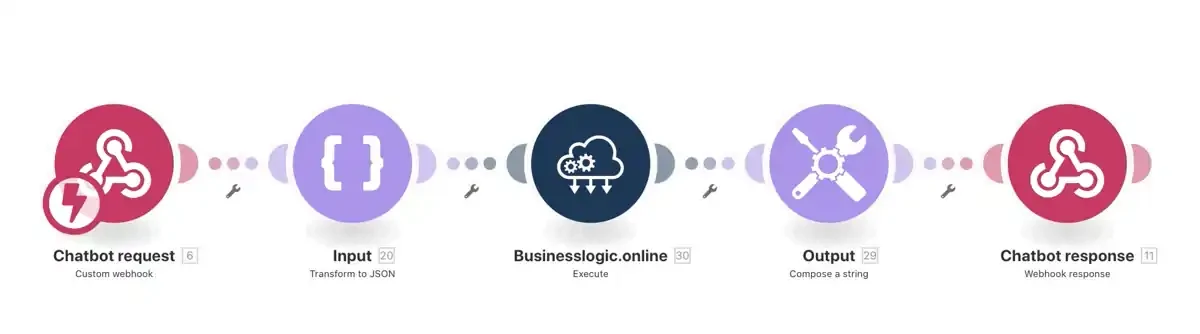
Three simple steps to get started, today
1
Create your web service
Upload your Excel file and turn it into an Excel-driven Businesslogic web service in a few clicks.
2
Build your workflow
Create your automated workflow and include your new Businesslogic web service alongside your other tools.
3
Let it run
Employ your workflow to work for you continuously — computing decisions around the clock, with no manual touchpoints.
Why should I use Businesslogic?
With Businesslogic your Excel Automation setup will take minutes, not weeks - no coding needed. You can start today.

No-code digitalization
Introduce services and processes that open up for an end-to-end digital setup.

Time-saving
Free up time from manual, tedious, repetitive tasks and unlock time for more valuable, creative work.

Empowering
Get the most out of your existing assets, knowledge and skills to supercharge your creativity and productivity.

Cost reduction
Remove development costs and manual touch points in your company workflows.

What is an Excel automated workflow?
It is a business process where your Excel models compute responses to human inputs automatically, at the exact points in the workflow where data or a decision is needed — so people stop copying numbers in and out of spreadsheets by hand.
Do I need to write code to automate workflows with Excel?
No. You upload your Excel file, mark the inputs and outputs, and Businesslogic turns it into a web service. Setup takes minutes, not weeks, and no programming is required.
What channels can I connect my Excel workflows to?
Websites, automated e-mail responses, chatbots, and mobile (SMS or push) — anywhere you can call a web service, your Excel computations can drive the response.
How long does it take to set up?
A basic Excel-driven workflow takes about three steps: create the web service from your file, include it in your workflow, then let it run continuously.